Prospero is the better fit for freelancers, agencies, consultants, and sales teams that need a dedicated proposal workflow with templates, interactive pricing, analytics, reminders, e-signatures, and business integrations. Canva is stronger for broad visual design, branded content, presentations, and general-purpose collaboration, with a more generous free plan.
- Prospero is purpose-built for creating, sending, tracking, following up on, and signing business proposals.
- Canva offers broader visual design capabilities, more general-purpose templates, and a permanent free plan.
- Prospero publishes proposal-specific analytics such as open counts, time open, status, acceptance rate, and email engagement.
- Canva offers document signing, but its public guidance says signatures may not be legally binding and places legal responsibility on the user.
- Canva publicly states SOC 2 Type II compliance and ISO 27001 certification; Prospero publicly provides GDPR information, but additional certifications were not verified from public sources reviewed.
- Prospero is the stronger workflow fit for recurring freelance and agency proposals, while Canva is the stronger choice for broad visual content creation.
Prospero vs Canva: Which Proposal Software Is Better for Freelancers and Sales Teams in 2026?
Prospero and Canva are both popular tools for creating professional-looking business materials, but they are built around different jobs. Canva is primarily a visual design and content creation platform. It helps individuals, marketers, and teams produce presentations, social media graphics, websites, videos, branded documents, and other visual assets.
Prospero is purpose-built for business proposals. It helps freelancers, agencies, consultants, and sales teams create, send, track, discuss, and sign proposals in one workflow.
That distinction matters if your goal is to win clients rather than simply make a document look attractive. Canva can help you design a persuasive proposal or pitch deck, while Prospero is designed to manage the proposal journey from first draft through client approval and e-signature.
This comparison focuses on proposal creation, templates, e-signatures, client workflows, sales enablement, freelance business use, analytics, integrations, pricing, security, and marketplace reviews. Pricing and product details were checked against publicly accessible pages on September 20, 2026.
Prospero vs Canva: Quick Verdict
Choose Prospero if you need a dedicated proposal workflow. Prospero combines proposal templates, an editor, interactive pricing, e-signatures, reminders, proposal tracking, analytics, team permissions, and business integrations. Its published individual plan starts at $12 per month when billed annually, with a 14-day free trial and unlimited proposals.
Choose Canva if visual design is the main requirement. Canva offers a broad visual workspace with templates for presentations, social media, documents, websites, video, and marketing assets. Its free plan is generous, and its paid plans provide premium assets, AI tools, brand controls, collaboration, and content management features.
For a one-off proposal that mainly needs visual polish, Canva may be sufficient. For recurring proposals that need client interaction, approval, signing, follow-up, and engagement data, Prospero is the more directly aligned tool.
Features
Proposal creation and templates
Prospero is designed around proposal creation rather than general-purpose design. Its public feature and pricing pages list more than 100 proposal templates, a content library, reusable variables, proposal layouts, interactive pricing, file attachments, PDF export, version history, proposal expiry dates, and an inline form. The template library covers areas such as marketing, graphic design, web design, copywriting, photography, consulting, software, events, and other service categories.
Prospero also supports reusable content and shared proposals. That is useful when a freelancer or agency repeatedly sells similar services but needs to customize the scope, price, timeline, and client information for every opportunity.
Canva has a much broader template ecosystem. Its public pricing page lists more than 1.6 million templates on the Free plan and more than 3.6 million templates on the Pro and Business plans, alongside design types for presentations, social posts, documents, video, websites, and other formats. This gives Canva a clear advantage for general visual content and brand asset production.
However, Canva’s breadth can also mean more manual assembly for a proposal workflow. You may need to create the document, establish a pricing section, share the file, collect feedback, handle signing separately or use Canva’s basic document-signing tool, and track follow-up through other systems.
For guidance on making a proposal template easier for clients to navigate, see how to build a proposal template for a smoother client workflow. The principles apply whether the first draft is created in Prospero, Canva, or another editor.
Design flexibility and branding
Canva is stronger as a visual design platform. It offers drag-and-drop editing, brand kits, premium design assets, image and video editing, presentations, documents, websites, and AI-assisted content creation. Canva Business adds collaboration and team administration features, brand controls, approvals, shared content, and higher AI allowances.
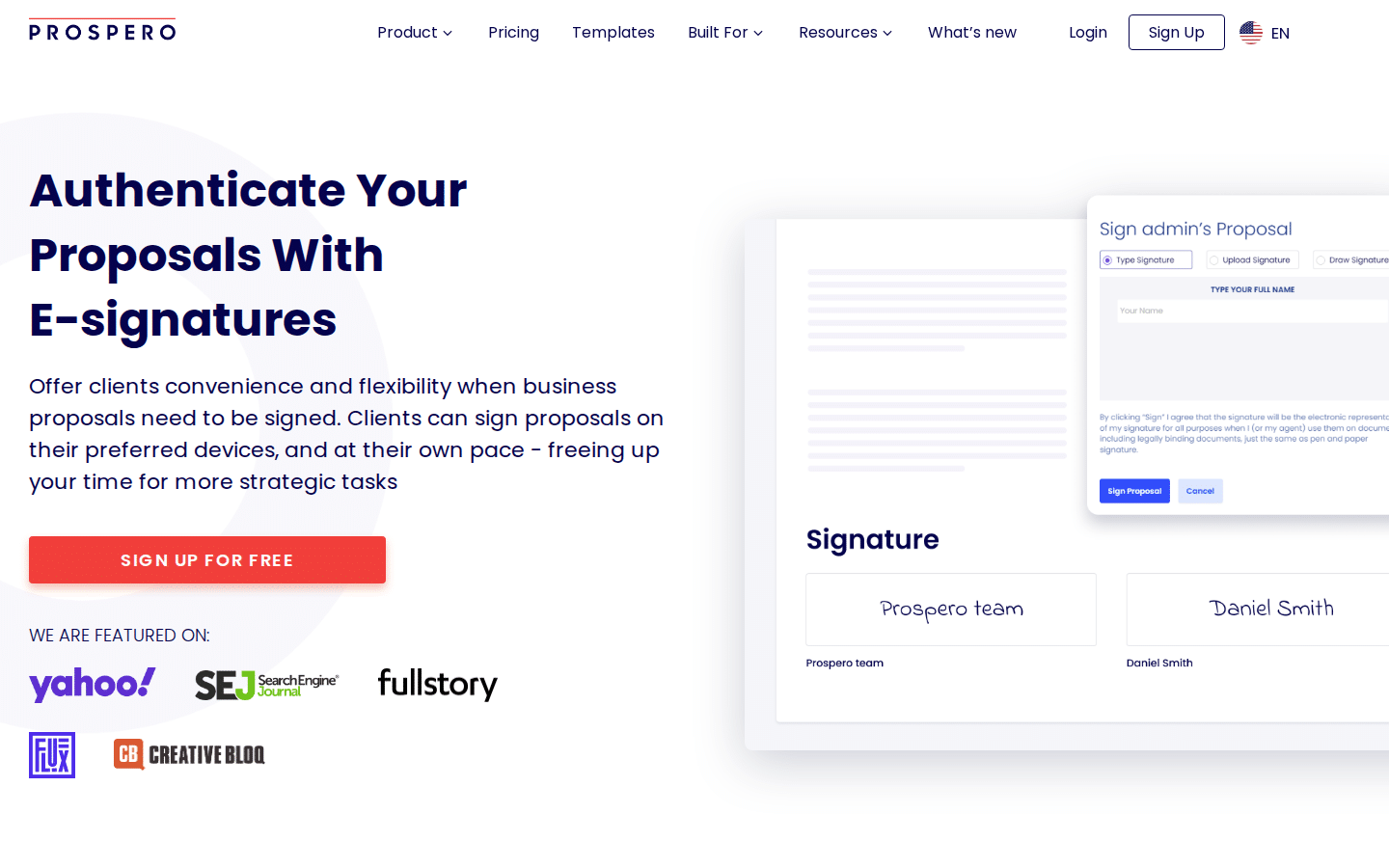
Prospero is less broad, but it is more focused. Its proposal editor supports images, text, video, pricing, layouts, attachments, branded fonts, PDF footers, and reusable content. For a service business, that focus can reduce the effort involved in turning a sales conversation into a structured proposal.
The practical difference is that Canva gives you more creative surface area, while Prospero gives you more proposal-specific structure.
E-signatures
Prospero includes e-signatures as part of its proposal workflow. Publicly listed capabilities include desktop and mobile signing, typed, drawn, or uploaded signatures, two signers, email notifications, and signature records containing timestamp, IP address, and device information. The client can review and sign the proposal without requiring a separate signature workflow.
Canva also provides a document-signing tool. Users can type, draw, or upload a signature, add it to a file, and download the signed document as a PDF. Canva’s own public guidance says users are responsible for determining whether a generated signature meets the legal requirements for a binding document and notes that signatures created through the tool may not be legally binding.
That is an important distinction. Canva can help place a signature on a document. Prospero presents e-signature as part of a proposal acceptance workflow and publishes additional signer metadata. If signatures are central to your sales process, Prospero offers the more specialized approach.
For broader context, read how e-signatures can build client trust and close deals faster.
Client workflows and collaboration
Canva supports sharing by link or email, view, comment, and edit permissions, real-time collaboration, comments, reactions, version history, team folders, and design approval workflows. Canva Business and Enterprise can help marketing and creative teams manage internal review and brand approval before content is published.
These features are valuable when the workflow is primarily internal or creative: a designer creates a draft, a manager comments, a stakeholder approves, and the team publishes the asset.
Prospero’s workflow is more commercial. Proposals can be sent to prospects, tracked after delivery, followed up with automated reminders, updated with client-specific pricing, and signed in the same environment. Publicly listed analytics include proposal open count, time open, status, acceptance rate, email opens and clicks, and device information.
Canva can show design insights and engagement with shared designs, but it is not presented publicly as a dedicated proposal pipeline or quote-to-signature system. If you need to know whether a prospect opened a proposal, how long they viewed it, and whether they accepted it, Prospero has the clearer product fit.
Once a client signs, your process still matters. This guide to what to do after a client signs a proposal covers the handoff steps that help turn approval into a successful project.
Sales enablement and integrations
Canva is useful for sales enablement when sales representatives need branded presentations, pitch decks, one-pagers, case studies, social graphics, videos, or other visual collateral. Canva publicly describes integrations and apps involving tools such as Slack, Asana, Microsoft Teams, Salesforce, Google Workspace, and a broader Apps Marketplace.
Prospero is more closely connected to the commercial proposal process. Its public pages list integrations with Stripe, QuickBooks, FreshBooks, Xero, Make, Zapier, Slack, and Monday.com, with additional integrations available. These connections can help bridge proposal creation, payment, accounting, automation, and project handoff.
For agencies and freelancers, that distinction is practical. Canva can help you make the sales material. Prospero can help you create the offer, present pricing, collect approval, track engagement, and connect the accepted proposal to downstream business tools.
Proposal analytics
Prospero publishes proposal-specific analytics. Depending on the feature and plan, users can see whether a proposal was opened, how many times it was opened, how long it remained open, the device used, the status of the proposal, acceptance rate, and engagement with proposal emails and reminders.
Canva offers design insights and can connect Google Analytics to Canva websites on supported plans. Those tools are useful for measuring activity around visual content or a published website, but they do not represent the same proposal-level acceptance and engagement workflow described by Prospero.
If you want to use engagement data during negotiation, read how to increase negotiation leverage by tracking proposal views and time spent. The key point is not to treat every view as buying intent, but to use timing and engagement as signals for relevant follow-up.
Pricing
The pricing models are different because the products serve different primary use cases.
| Pricing factor | Prospero | Canva |
|---|---|---|
| Free plan | A 14-day free trial is publicly listed. A permanent free plan was not clearly listed on the public pricing page reviewed. | Free plan available at US$0 per year for one person. |
| Entry paid price | US$12 per month when billed annually. The monthly display is US$19 per month. | Canva Pro is publicly listed at US$180 per year for one person, equivalent to US$15 per month when averaged annually. Canva Business is listed at US$250 per year per person on the public pricing page, while Canva’s launch announcement described Business at US$20 per person per month for new sign-ups. Verify the checkout price for the billing option and region before purchasing. |
| Billing period | Monthly or annual pricing is displayed. Annual billing is shown as saving 37%. | Monthly and yearly options are displayed. The public pricing page advertises yearly savings of 16%. |
| Usage metric | Unlimited proposals and unlimited proposal emails are publicly listed on the individual plan. | Plans are primarily differentiated by user, storage, premium content, brand kits, collaboration, and AI allowances rather than proposal volume. |
| Material limits | The public page lists one individual-focused plan with proposal, analytics, e-signature, integration, and collaboration features. Team needs may require plan configuration based on member count. | Free includes 5GB storage and one three-color Brand Kit. Pro lists 100GB storage and five Brand Kits. Business lists 500GB storage, 100 Brand Kits and approvals, collaboration tools, and higher AI allowances. Canva Enterprise pricing is not publicly listed. |
Prospero’s advantage is pricing clarity for a proposal-focused buyer: the published entry plan includes unlimited proposals and the core workflow needed by an individual freelancer. Canva’s free plan is more accessible for general design, but proposal-related work may require additional tools or manual steps. Canva’s premium plans can still be strong value if you need one platform for a wide range of visual content.
For the latest Prospero plan details, see the Prospero pricing page. Canva’s pricing is attributed here in plain text because competitor pricing pages are not linked in the article.
Target Audience and Best Fit
Prospero is best for:
- Freelancers who send proposals regularly.
- Creative, marketing, web development, consulting, and digital agencies.
- Service businesses that need interactive pricing and client approvals.
- Sales teams that want proposal engagement data before following up.
- Businesses that need proposal e-signatures and signer records.
- Teams connecting proposals with payments, accounting, automation, or project-management tools.
Canva is best for:
- Individuals creating presentations, social posts, videos, websites, and general business documents.
- Marketing teams managing visual content and brand assets.
- Organizations that need collaborative design, comments, approvals, and brand controls.
- Sales teams producing pitch decks, one-pagers, case studies, and presentation assets.
- Small businesses that want a generous free plan for general design work.
A freelancer may reasonably use both. Canva can produce a brand identity, presentation graphics, social content, and visual assets. Prospero can turn those assets into a repeatable proposal process with pricing, tracking, signing, reminders, and client handoff.
If you are still deciding between manual documents and dedicated software, see why online proposal software can be better than sending PDFs.
Compliance and Security
Canva
Canva publicly states that it is SOC 2 Type II compliant and ISO 27001 certified. Its security materials also list SOC 3, PCI DSS, and the EU-U.S., UK Extension, and Swiss-U.S. Data Privacy Framework commitments. Canva describes encryption in transit using TLS and encryption at rest using AES-256, along with SSO, MFA options, role-based access, monitoring, vulnerability testing, and a bug bounty program.
Canva’s public trust materials reference GDPR and CCPA-related privacy obligations and provide information about data protection, retention, deletion, access, and portability. The public trust portal also lists additional compliance and assurance documentation, some of which may require access requests.
HIPAA compliance was not verified from the public materials reviewed. A buyer with regulated healthcare workloads should request the relevant contractual and security documentation directly and confirm whether the intended use case is supported.
Prospero
Prospero publicly provides a GDPR information page describing an updated privacy policy, supplier requirements, account deletion, and personal-data export requests. Its public e-signature feature page describes timestamp, IP, and device information associated with signatures.
However, I could not publicly verify a Prospero ISO 27001 certification, SOC 2 report, SOC 3 report, PCI DSS certification, HIPAA compliance claim, CCPA certification, or public data-hosting location from the materials reviewed. That does not establish that Prospero lacks internal controls or contractual safeguards; it means those specific claims were not verifiable through the public sources checked.
For both products, buyers should review the current privacy policy, data-processing terms, subprocessors, retention practices, access controls, and contractual requirements before uploading sensitive client information. Security certifications can be valuable, but they do not replace a use-case-specific vendor review.
Marketplace Reviews
Canva has a large public review footprint. On G2, the Canva seller page showed 4.7 out of 5 from 8,238 reviews when checked on September 20, 2026, while the featured Canva product listing showed 7,699 reviews. On Capterra, Canva showed 4.7 out of 5 from 13,448 reviews on the current reviews page. Trustpilot showed a 4.0 out of 5 TrustScore from 7,262 reviews.
Across the accessible review summaries, commonly praised themes include ease of use, the breadth of templates and assets, fast creation, accessibility for non-designers, and collaboration. Recurring criticisms include premium content restrictions, occasional performance or mobile-editing friction, limitations compared with advanced professional design software, and mixed customer-service or billing experiences.
Review counts and scores are snapshots that can change frequently. They also reflect different audiences and review collection methods, so they should be treated as directional evidence rather than a universal measure of product quality. Publicly comparable review data for Prospero was not collected as part of this article, so no Prospero rating or review count is presented here.
Conclusion
Canva is an excellent general-purpose design platform with a generous free tier, extensive templates, strong visual editing, brand management, collaboration, and broad content capabilities. It is a strong choice when the main challenge is creating attractive visual content across many formats.
Prospero is the stronger fit when the main challenge is converting a sales opportunity into an approved and signed engagement. It provides a more focused proposal workflow, published proposal analytics, interactive pricing, reminders, proposal-specific templates, e-signatures with signer metadata, and integrations that connect proposals with payments, accounting, automation, and project management.
Prospero is not universally better. Canva offers broader design functionality and a larger general-purpose ecosystem, while Canva’s free plan may be the better starting point for occasional documents or visual sales collateral. But for freelancers, agencies, consultants, and sales teams that send proposals repeatedly, Prospero offers clearer workflow fit and more directly relevant capabilities at its published entry price. If you want to replace scattered documents and follow-up tasks with a dedicated proposal process, Sign up for Prospero and try the workflow for yourself.
Frequently Asked Questions
Can Canva create business proposals?
Yes. Canva can create documents, presentations, pitch decks, branded pages, and other visual proposal materials using templates and its editor. It is primarily a design platform, so proposal tracking, acceptance workflows, and specialized sales operations may require additional tools or manual processes.
Does Canva have e-signatures?
Canva provides a tool for typing, drawing, or uploading a signature onto a digital file and downloading the result. Canva’s public guidance says users are responsible for determining whether the signature meets the legal requirements for a binding document and notes that signatures created through the tool may not be legally binding.
Does Prospero include proposal analytics?
Yes. Prospero publicly lists proposal open counts, open duration, proposal status, acceptance rate, and engagement with proposal emails and reminders. The available data helps users decide when and how to follow up, although engagement should not be treated as a guarantee of buying intent.
Is Canva cheaper than Prospero?
Canva has a permanent free plan, so it is cheaper for users who only need basic design capabilities. Its paid plans serve broader creative and collaboration needs. Prospero’s published individual plan starts at $12 per month when billed annually and includes unlimited proposals and proposal-specific workflow features. The better value depends on whether you need general design or dedicated proposal management.
Can I use Canva and Prospero together?
Yes. A business can use Canva for brand assets, presentation graphics, case-study visuals, and other creative work, then use Prospero to assemble proposals, manage pricing, send documents, track engagement, collect signatures, and follow up with prospects.